
We are happy to announce that Hudiy 1.28/2.24 is now available. You can find the release highlights below:
iOS/iPhone
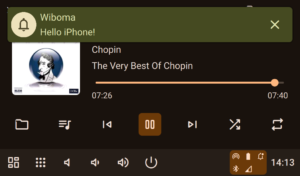
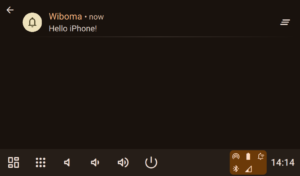
We added support for receiving phone notifications and time synchronization with Hudiy. Both notifications and time synchronization work via Bluetooth Low Energy. This brings feature parity with the Android platform, where Hudiy receives notifications and synchronizes time using a companion app.
To use this feature on an existing Hudiy installation, you must enable Bluetooth Low Energy in the /etc/bluetooth/main.conf file by changing ControllerType to dual (a reboot is required after the change). Starting with this version, dual mode is the default for new installations.
After enabling Bluetooth Low Energy, you must re-pair the iPhone with Hudiy. To activate time synchronization and notifications, the pairing process must be initiated from the iPhone. Once paired, you must also grant permission to access notifications.
https://github.com/wiboma/hudiy/blob/main/README.md#phone-notifications
https://github.com/wiboma/hudiy/blob/main/README.md#time-synchronization
https://github.com/wiboma/hudiy/blob/main/main_configuration.md#bluetooth
AUX
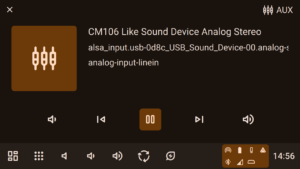
We added an AUX player that plays audio from the sound card’s input port. The player is integrated with Hudiy’s audio focus system and supports an API for setting metadata and receiving playback events.
The AUX player is triggered by the aux_player action, which can be added for example to applications_menu.json.
https://github.com/wiboma/hudiy/blob/main/README.md#aux
https://github.com/wiboma/hudiy/blob/main/config/applications_menu.json
https://github.com/wiboma/hudiy/blob/main/examples/api/python/AuxMetadata.py
https://github.com/wiboma/hudiy/blob/main/examples/api/python/AuxPlaybackEvents.py
UI
- We improved the dark mode color contrast.
- We added call history grouping.
- We added an option to toggle the display of phone notifications.
Companion app
We improved the Bluetooth connection process with Hudiy. The new version is available on the Google Play Store.
You can download and install the update using the updater program – https://github.com/wiboma/hudiy/blob/main/README.md#updating
Please note that the updater performs an incremental update (version by version) to avoid the OS corruption during the update process. If you are using an older version of Hudiy, you may need to run the updater multiple times. You can check your current version in Menu -> Hudiy -> Settings -> About.
A description of all new features and configuration options is available on our GitHub in the updated documentation – GitHub.
As always, we encourage you to follow us on Instagram, YouTube, X (formerly Twitter), and Facebook.
Enjoy!