**Hudiy Project Update – Steering Wheel Controls and Vehicle Status Widget**
Hi everyone,
I wanted to share a new update on my Hudiy project.
The factory steering wheel buttons are now decoded from the CAN bus and mapped to Hudiy API commands. This means I can control the interface directly from the original steering wheel buttons without using any external controller.
**Vehicle Status Widget**
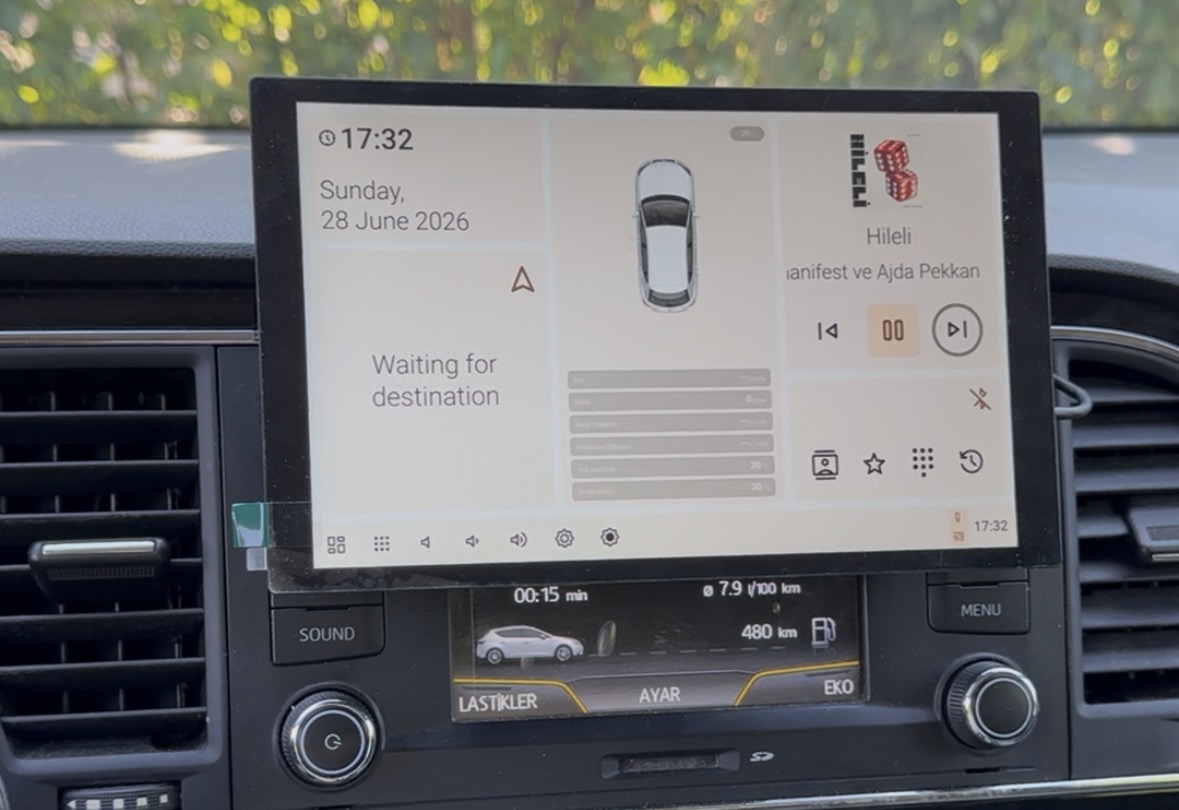
I also added a custom car status widget to the Hudiy dashboard.
This widget shows real-time vehicle information decoded from CAN, including door states. The car graphic updates depending on which door is open or closed. For now, I have confirmed the CAN data for the four doors and mapped them into the widget.
The widget is designed to be expanded further with more vehicle data such as speed, RPM, outside temperature, coolant temperature, oil temperature, fuel consumption and other useful information.
Another improvement is automatic brightness and theme control. The system now reads the brightness information from the vehicle’s instrument cluster over CAN. Based on this value, Hudiy can automatically adjust the screen brightness and switch between dark and light mode, similar to the original vehicle behavior.
Since the beginning of the project, I have also worked on:
* Hudiy API communication
* Steering wheel button decoding
* Dashboard layout customization
* Automatic brightness control from the instrument cluster
* Automatic dark/light mode switching based on vehicle brightness data
* Vehicle status widget
* Door state decoding from CAN
* Outside Temp from CAN
* Clock/Date info from CAN
The next steps will be improving the visual design, making the vehicle status screen more polished, adding smoother brightness/dimming behavior, and decoding more CAN signals.
I’m still actively developing and testing the system, but it is already becoming much more usable and integrated with the car.
https://www.youtube.com/shorts/NfhEbyzc ... ture=share
- IMG_6739.jpg (140.94 KiB) Viewed 74 times