Page 1 of 2
Question Regarding Gauge Cluster Widget
Posted: Sun Jan 25, 2026 11:23 pm
by wayland
Hey there! First off, I want to thank everyone so much for this amazing software. It really is super useful and has brought new life to my old car.
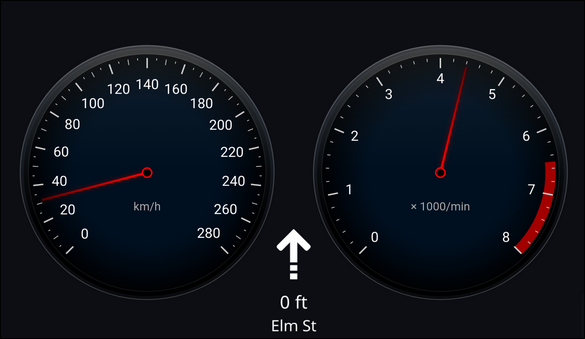
I had a quick question regarding one of the marketed extensions/widgets for hudiy. I noticed that you show this analogue speed/tachometer/navigation cluster running on a separate display on your YouTube page as well as the main GitHub repo, but I haven't been able to figure out just where the template for this is. Also, I wondered what would be the best way to modify the look of this (maybe change the background and add a digital read out of the speed), and if there is a way I could modify it via my computer without having to re-upload it to the head unit every time I made a change (as I assume it is a HTML/JS file integrated with the Hudiy API).
I bought a cheap display I am going to integrate into my car's dash in place of a few analogue dials and connect as a second display to my main Hudiy head unit, and I thought this would look super nice.
Thanks!
- 2026-01-25-181157_hyprshot.png (102.63 KiB) Viewed 482 times
Re: Question Regarding Gauge Cluster Widget
Posted: Sun Jan 25, 2026 11:58 pm
by hudiy
Hello,
Thank you for your kind words. We are glad to hear that you enjoy using Hudiy.
The items visible in the screenshot are available on our GitHub
https://github.com/wiboma/hudiy/tree/ma ... les/api/js. You can find an example configuration on our forum showing how to display them on the Hudiy interface using overlays:
viewtopic.php?p=212&hilit=tacho#p212
The tacho and speedo examples use the Hudiy API, which allows you to easily communicate with the ELM327. You can also modify the HTML/JS to use your own data source - in that case, Hudiy will simply act as the display.
To run the HTML/JS examples that use the API, you must serve them via an HTTP server due to the Same-Origin Policy (browser security) -
https://developer.mozilla.org/en-US/doc ... gin_policy
For editing code directly on the Raspberry Pi, we recommend using Visual Studio Code with the SSH extension. You can run Visual Studio Code on your computer and connect it to Raspberry Pi via SSH extension:
https://code.visualstudio.com/docs/remote/ssh
Useful links:
Examples:
https://github.com/wiboma/hudiy/tree/main/examples
API docs:
https://github.com/wiboma/hudiy/blob/main/api/Api.proto
Web view:
https://github.com/wiboma/hudiy/blob/ma ... d#web-view
Overlays:
https://github.com/wiboma/hudiy/blob/ma ... d#overlays
Re: Question Regarding Gauge Cluster Widget
Posted: Mon Jan 26, 2026 2:24 am
by wayland
Awesome. Thank you so much for the detailed information. I must have missed the configuration example you linked on the forum the first time I looked through. Really appreciate it

Re: Question Regarding Gauge Cluster Widget
Posted: Mon Mar 09, 2026 9:43 pm
by SlowLearner
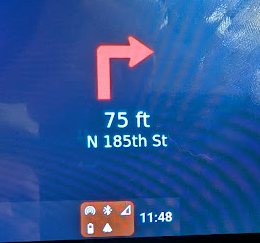
I successfully created the GPS Navigation Overlay like the one shown above. I have an issue and a question...
Issue:
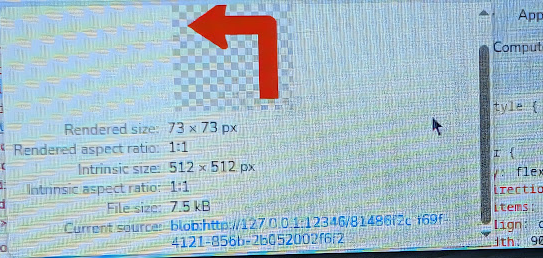
The navigation overlay (copied directly from the github: navigation.html) works well and the text is white, but the icons/arrows are RED. Any idea why this would be? If I open the html file in a browser window while Hudiy is running, the arrows are white, but in an overlay in Hudiy they're re
Question:
In the example image shown above, is that three separate overlays displayed at once, or were all combined into one html file for a single overlay? (or was that a photoshopped mockup?) I'm just trying to figure out layout/space limitations.
Thanks!
Re: Question Regarding Gauge Cluster Widget
Posted: Mon Mar 09, 2026 9:58 pm
by hudiy
The navigation maneuver icon is passed via the API directly from Android Auto. On all the phones and apps we have tested, the icon was white. You can force the white color in CSS, for example, by adding filter: brightness(0) invert(1); to #icon.
Code: Select all
#icon {
    width: 30vw;
    height: 30vw;
    max-height: 30vh;
    object-fit: contain;
    opacity: 0;
    transition: opacity 0.3s ease;
    filter: brightness(0) invert(1);
}
In the mentioned screenshot, three overlays are visible (tacho.html, speedo.html, and navigation.html). You can position the overlays in the overlays.json configuration file, by using a drag & drop gesture (after a long press on the selected overlay), or by using the arrow keys (left, right, up, down) and 't' (toggle overlay).
https://github.com/wiboma/hudiy/blob/ma ... d#overlays
https://github.com/wiboma/hudiy/blob/ma ... #interface
Re: Question Regarding Gauge Cluster Widget
Posted: Mon Mar 09, 2026 10:35 pm
by SlowLearner
Thanks so much for your help!
I should clarify something that I was wrong about earlier...
Initially the maneuver icon was red in both a browser window AND in the Hudiy overlay. Then I tried the filter: brightness(0) invert(1); trick and it only worked in the browser window, but didn't have an effect in the Hudiy overlay.
Re: Question Regarding Gauge Cluster Widget
Posted: Mon Mar 09, 2026 10:40 pm
by hudiy
Could you please post a screenshot? What navigation app do you use? Is it Raspberry Pi or an x86_64 platform?
Re: Question Regarding Gauge Cluster Widget
Posted: Tue Mar 10, 2026 6:03 pm
by SlowLearner
Raspberry Pi 4b - Trixie - latest version of Hudiy
Google Pixel 10 - Waze for navigation
- Arrow.png (104.16 KiB) Viewed 336 times
- Source.png (351.62 KiB) Viewed 336 times
So the image is coming through as red.
Interesting thing I discovered last night, though...
The addition of "filter: brightness(0) invert(1);" eventually DID work. But only after I started a new HTTP server on a different port (and pointed the overlay settings there. Is Hudiy storing the html in cache? I had to start a new server on a different port to see change in Hudiy, but a browser window loaded the latest code. The other thing that reinforces this thought is... I can restart the Pi and NOT start the HTTP server, and the navigation.html will still work in Hudiy but not in a browser window. That's why I was seeing different behavior in a browser window vs Hudiy. That's why I wonder if there is a cache that needs to be cleared to see my changes take effect?
Re: Question Regarding Gauge Cluster Widget
Posted: Wed Mar 11, 2026 7:50 am
by hudiy
SlowLearner wrote: Tue Mar 10, 2026 6:03 pm
Raspberry Pi 4b - Trixie - latest version of Hudiy
Google Pixel 10 - Waze for navigation
Arrow.png
Source.png
So the image is coming through as red.
Interesting thing I discovered last night, though...
The addition of "filter: brightness(0) invert(1);" eventually DID work. But only after I started a new HTTP server on a different port (and pointed the overlay settings there. Is Hudiy storing the html in cache? I had to start a new server on a different port to see change in Hudiy, but a browser window loaded the latest code. The other thing that reinforces this thought is... I can restart the Pi and NOT start the HTTP server, and the navigation.html will still work in Hudiy but not in a browser window. That's why I was seeing different behavior in a browser window vs Hudiy. That's why I wonder if there is a cache that needs to be cleared to see my changes take effect?
Yes, that is the behavior of the cache. The cache is located in $HOME/.hudiy/cache/web directory. When working on your extensions, you can add the
rm -rf $HOME/.hudiy/cache/web/Cache command (e.g., to $HOME/.hudiy/share/hudiy_startup.sh) before launching Hudiy, so that the cache clears automatically. After you finish working, you can remove it.
https://github.com/wiboma/hudiy/blob/ma ... d#web-view
Re: Question Regarding Gauge Cluster Widget
Posted: Fri Mar 13, 2026 5:13 am
by SlowLearner
That worked perfectly, and cuts down on development time!
Still, why do you think the icons would be coming through in red?