RNS-E in A4 B7 with touchscreen integration
Posted: Fri Jan 23, 2026 7:00 am
Hello guys!
like Korni92 here with his Audi A2, I'm working on an A4/RS4 B7,
Orginilly equiped with an RNS-E 192, I have try few years ago a chineese Android auto system.
I have lost Bose sound system... Poor solution for me...
Now, I using RNS-E with 480x800 pixels resolution.
Trixie on my Pi5 working!
Touchscreen too! Retrofited
Just need to buy an other connector for routing in RNS-E and fixing pcb in the box, Flexible Flat Cable is too short for perfect integration
I'll try to do as smarter as possible integration.
My setup:
-RNS-E 193
-Pi5
-CarPiHat Pro 5
-Hdmi to Vga from Twozoh
-VGA to RGB Sync Converter.
Good news: My Samsung S24 ultra is working wirelessly without any adapter!
Later, i'll remove Sd card for a NVMe disk.
I must double check canbus configuration, the Korni92's software dosen't running correctly for me.
Some artifacts when i'm in Trixie desktop...
And script for auto shutdown doesnt work yet...
Video of test here:
https://youtu.be/9Rre76Y7M20?si=OLtsIMQf7pD22flO
Thanx to all for your projects.
It's very inspiring!
Later I'll install "hudiy/examples/idle_screen",
But for now I don't understand yet logic to install it.
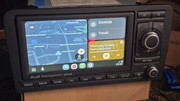
Result without touch screen:
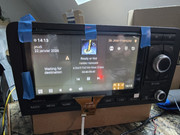
touch screen test:
Integration perfect fitting:
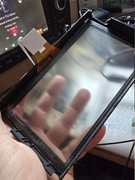
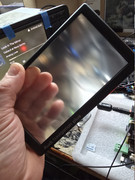
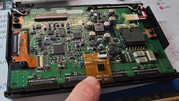
Touch controler chip:
like Korni92 here with his Audi A2, I'm working on an A4/RS4 B7,
Orginilly equiped with an RNS-E 192, I have try few years ago a chineese Android auto system.
I have lost Bose sound system... Poor solution for me...
Now, I using RNS-E with 480x800 pixels resolution.
Trixie on my Pi5 working!
Touchscreen too! Retrofited
Just need to buy an other connector for routing in RNS-E and fixing pcb in the box, Flexible Flat Cable is too short for perfect integration
I'll try to do as smarter as possible integration.
My setup:
-RNS-E 193
-Pi5
-CarPiHat Pro 5
-Hdmi to Vga from Twozoh
-VGA to RGB Sync Converter.
Good news: My Samsung S24 ultra is working wirelessly without any adapter!
Later, i'll remove Sd card for a NVMe disk.
I must double check canbus configuration, the Korni92's software dosen't running correctly for me.
Some artifacts when i'm in Trixie desktop...
And script for auto shutdown doesnt work yet...
Video of test here:
https://youtu.be/9Rre76Y7M20?si=OLtsIMQf7pD22flO
Thanx to all for your projects.
It's very inspiring!
Later I'll install "hudiy/examples/idle_screen",
But for now I don't understand yet logic to install it.
Result without touch screen:
touch screen test:
Integration perfect fitting:
Touch controler chip: