Page 2 of 3
Re: Bad colour banding in carplay
Posted: Sun Oct 26, 2025 11:33 am
by alex124.rh
Okay, thanks for the helpful insight.
Nevertheless it’s not ideal, I will submit a report to apple.
Could you test in your end to see if it’s affected.
Re: Bad colour banding in carplay
Posted: Mon Oct 27, 2025 2:00 pm
by alex124.rh
Please let me know if you can see if it’s just mine or if it occurs on yours
Thanks
Re: Bad colour banding in carplay
Posted: Thu Oct 30, 2025 1:49 am
by ltlnmo
I also notice that the blacks seem very very black and the colors are very very saturated when comparing to my same Carplay setup on Lineage OS (Android). Any fix?
Re: Bad colour banding in carplay
Posted: Thu Oct 30, 2025 1:50 am
by ltlnmo
I also noticed that Carplay on Hudiy the blacks are very very black and the colors are very very saturated/vivid when compared to the same Carplay setup on Lineage OS (android)
Re: Bad colour banding in carplay
Posted: Thu Oct 30, 2025 4:01 am
by alex124.rh
Yeah, this for sure needs investigation
Re: Bad colour banding in carplay
Posted: Thu Oct 30, 2025 6:39 am
by hudiy
ltlnmo wrote: Thu Oct 30, 2025 1:50 am
I also noticed that Carplay on Hudiy the blacks are very very black and the colors are very very saturated/vivid when compared to the same Carplay setup on Lineage OS (android)
That might be related to the colorimetry. The most common colorimetry in Raspberry Pi OS is BT.709. For resolution <480p as far as we know the BT.601 might be selected by the decoder/GPU driver (kernel). Is your screen detected the same way on Raspberry Pi OS and Android?
Re: Bad colour banding in carplay
Posted: Thu Oct 30, 2025 11:23 am
by alex124.rh
But we have seen it still shows up on other devices when screenshotted?
Re: Bad colour banding in carplay
Posted: Tue Nov 04, 2025 10:20 am
by alex124.rh
Any chance you could test this? Been waiting for a reply. Would be much appreciated:)
Re: Bad colour banding in carplay
Posted: Sun Nov 09, 2025 11:35 pm
by hudiy
We found a possible issue. On some displays, Raspberry Pi OS forces a 16-bit color depth for OpenGL surfaces, which can indeed cause color banding. We managed to find a screen where we were able to reproduce the problem you're likely describing. We'll include a fix in the upcoming release.
Wrong bit depth:
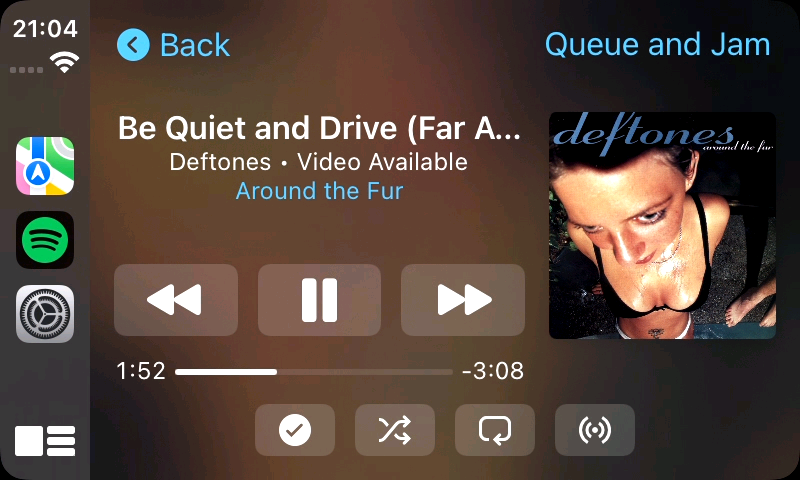
- 20251109_21h04m40s_grim.png (203.94 KiB) Viewed 989 times
Correct bit depth:
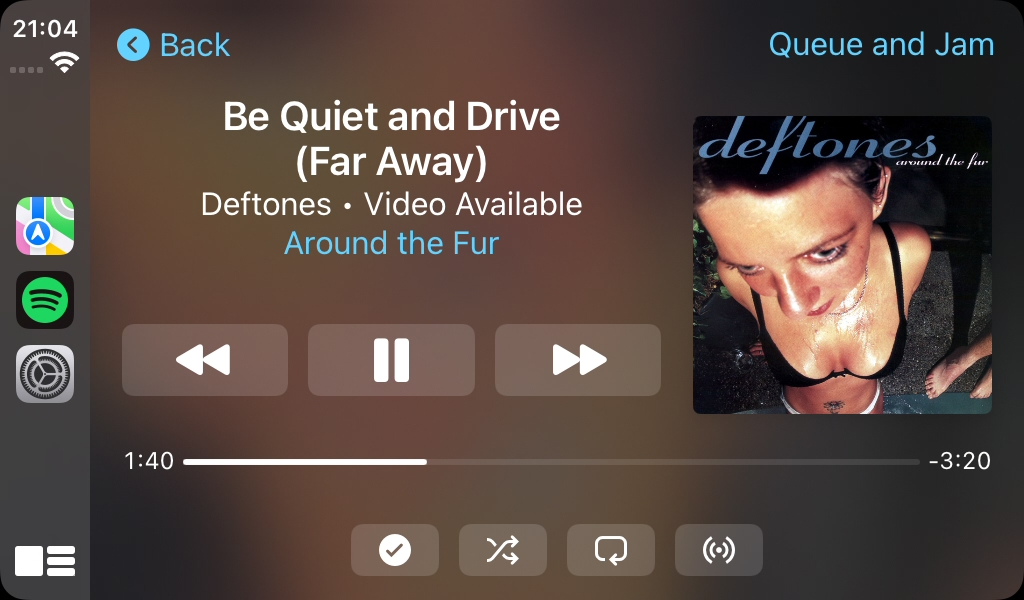
- 20251109_21h04m11s_grim.png (466.89 KiB) Viewed 989 times
Re: Bad colour banding in carplay
Posted: Mon Nov 10, 2025 11:27 am
by alex124.rh
hi there,
thanks for this. when can i expect a fix? is there something i can do in the meantime that will help? as i cant use it like this frustratingly.
also small observation that, interestingly there is different scaling across these two images. how do i get the smaller scaling rather than the first image where its massive. are these two screenshots from the same screen.
thanks for solving this it was getting very annoying!