If you’d like to use the examples available on our GitHub, below we’re sharing configuration files based on the default ones. You can copy and paste them into the files in your installation (in
$HOME/.hudiy/share/config). Note that the
.hudiy folder is hidden (the dot before the name). To show hidden files in the Raspberry Pi file manager (pcmanfm), use the key combination CTRL + H (toggles hidden files on or off).
To run the HTML/JavaScript examples, you’ll need to configure ELM327 — the instructions are here:
viewtopic.php?t=25
You’ll also need to install and start an HTTP server — this is described in the README file for the examples:
https://github.com/wiboma/hudiy/blob/ma ... javascript
To start the HTTP server automatically at system startup, you can add it to
/etc/xdg/labwc/autostart. This is a system file that requires administrator privileges to edit. The simplest way is to open it in the terminal with an editor such as nano:
Code: Select all
sudo nano /etc/xdg/labwc/autostart
In the configuration files below, we assume that the HTTP server has been started on port 12345 in the
api/js examples directory. The file
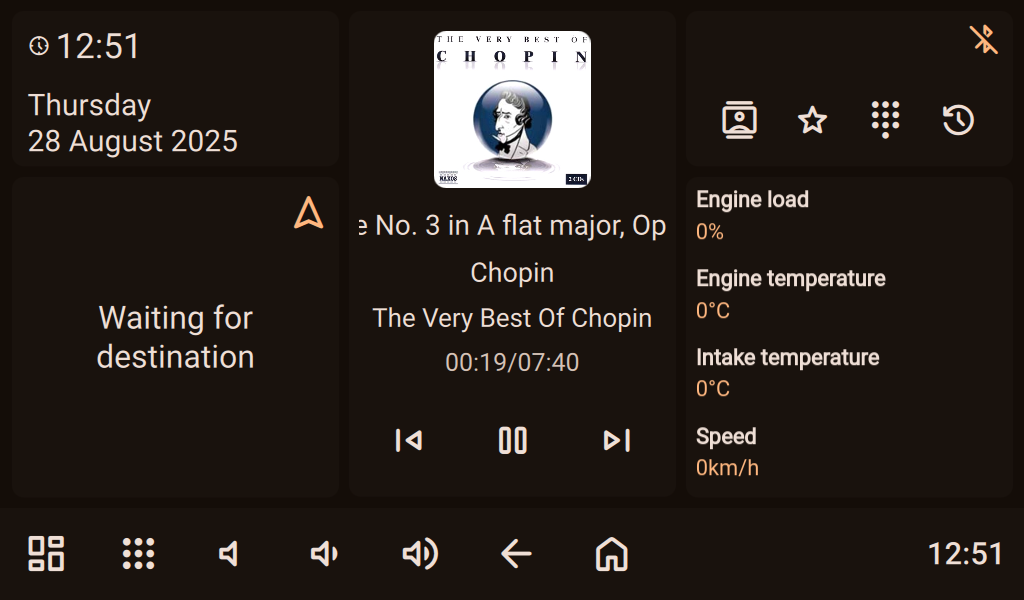
obd_widget.html has been added as a widget,
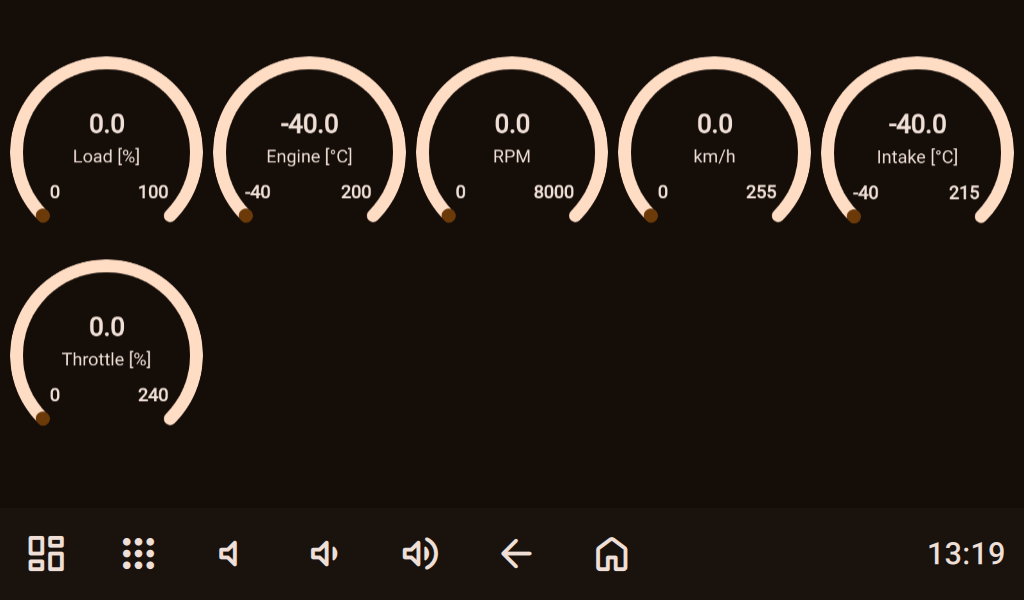
gauges.html as an application, and the files
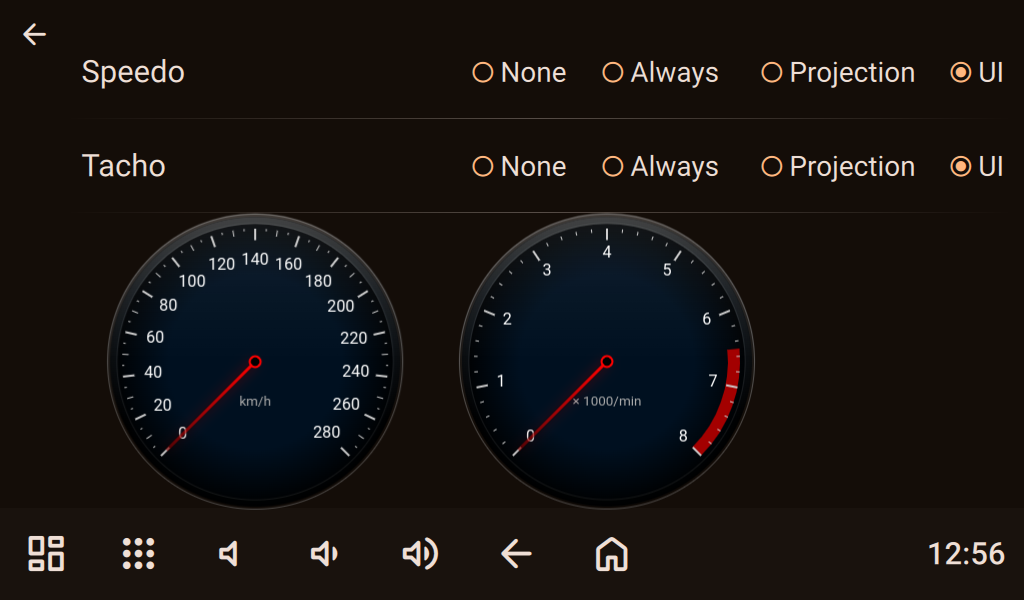
tacho.html and
speedo.html as overlays.
applications.json
Code: Select all
{
    "applications": [
        {
            "action": "obd2_gauges_app",
            "url": "http://127.0.0.1:12345/gauges.html"
        }
    ]
}
Code: Select all
{
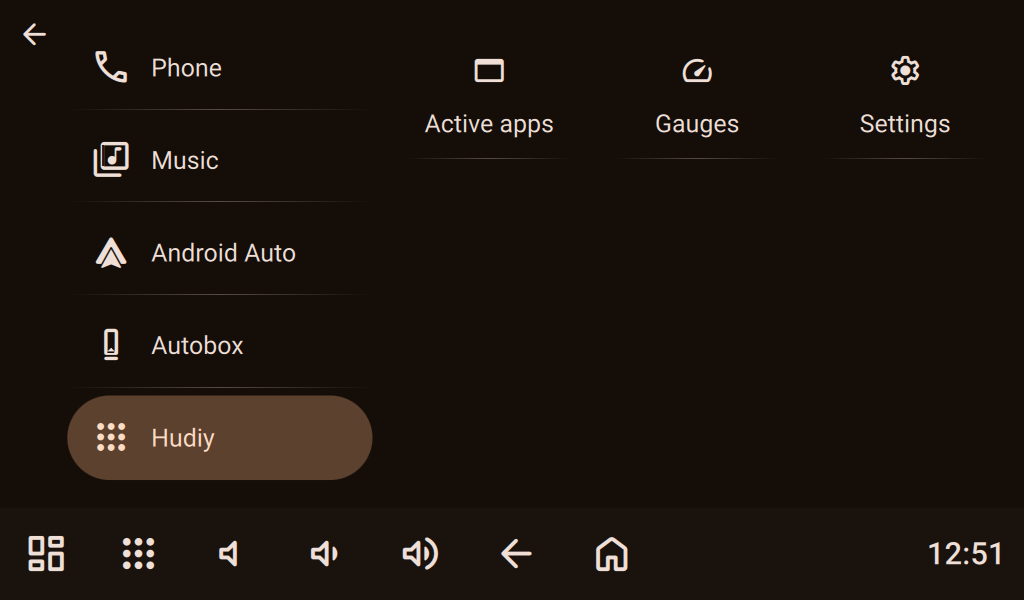
    "categories": [
        {
            "isDefault": true,
            "iconFontFamily": "Material Symbols Rounded",
            "iconName": "call",
            "label": "Phone"
        },
        {
            "iconFontFamily": "Material Symbols Rounded",
            "iconName": "library_music",
            "label": "Music"
        },
        {
            "iconFontFamily": "Hudiy Symbols",
            "iconName": "\ue900",
            "label": "Android Auto"
        },
        {
            "iconFontFamily": "Material Symbols Rounded",
            "iconName": "general_device",
            "label": "Autobox"
        },
        {
            "iconFontFamily": "Material Symbols Rounded",
            "iconName": "apps",
            "label": "Hudiy"
        }
    ],
    "items": [
        {
            "categories": [
                "Phone"
            ],
            "iconFontFamily": "Material Symbols Rounded",
            "iconName": "contacts",
            "action": "contacts",
            "label": "Contacts"
        },
        {
            "categories": [
                "Phone"
            ],
            "iconFontFamily": "Material Symbols Rounded",
            "iconName": "contacts",
            "action": "favorite_contacts",
            "label": "Favorites"
        },
        {
            "categories": [
                "Phone"
            ],
            "iconFontFamily": "Material Symbols Rounded",
            "iconName": "dialpad",
            "action": "dialpad",
            "label": "Dialpad"
        },
        {
            "categories": [
                "Phone"
            ],
            "iconFontFamily": "Material Symbols Rounded",
            "iconName": "call_log",
            "action": "calls_history",
            "label": "Call log"
        },
        {
            "categories": [
                "Phone"
            ],
            "iconFontFamily": "Material Symbols Rounded",
            "iconName": "phone_in_talk",
            "action": "active_call",
            "label": "Active call"
        },
        {
            "categories": [
                "Phone"
            ],
            "iconFontFamily": "Material Symbols Rounded",
            "iconName": "notifications",
            "action": "phone_notifications",
            "label": "Notifications"
        },
        {
            "categories": [
                "Music"
            ],
            "iconFontFamily": "Material Symbols Rounded",
            "iconName": "audio_file",
            "action": "storage_music_player",
            "label": "Storage Music"
        },
        {
            "categories": [
                "Music"
            ],
            "iconFontFamily": "Material Symbols Rounded",
            "iconName": "cell_tower",
            "action": "fm_radio_player",
            "label": "FM Radio"
        },
        {
            "categories": [
                "Music"
            ],
            "iconFontFamily": "Material Symbols Rounded",
            "iconName": "media_bluetooth_on",
            "action": "a2dp_music_player",
            "label": "A2DP"
        },
        {
            "categories": [
                "Music"
            ],
            "iconFontFamily": "Material Symbols Rounded",
            "iconName": "general_device",
            "action": "autobox_player",
            "label": "Autobox Music"
        },
        {
            "categories": [
                "Music"
            ],
            "iconFontFamily": "Hudiy Symbols",
            "iconName": "\ue900",
            "action": "android_auto_player",
            "label": "Android Auto"
        },
        {
            "categories": [
                "Hudiy"
            ],
            "iconFontFamily": "Material Symbols Rounded",
            "iconName": "web_asset",
            "action": "background_applications",
            "label": "Active apps"
        },
        {
            "categories": [
                "Hudiy"
            ],
            "iconFontFamily": "Material Symbols Rounded",
            "iconName": "speed",
            "action": "obd2_gauges_app",
            "label": "Gauges"
        },
        {
            "categories": [
                "Hudiy"
            ],
            "iconFontFamily": "Material Symbols Rounded",
            "iconName": "settings",
            "action": "settings_menu",
            "label": "Settings"
        },
        {
            "categories": [
                "Android Auto"
            ],
            "iconFontFamily": "Material Symbols Rounded",
            "iconName": "usb",
            "action": "connect_android_auto_usb",
            "label": "Connect USB"
        },
        {
            "categories": [
                "Android Auto"
            ],
            "iconFontFamily": "Material Symbols Rounded",
            "iconName": "wifi",
            "action": "connect_android_auto_wifi",
            "label": "Connect WiFi"
        },
        {
            "categories": [
                "Android Auto"
            ],
            "iconFontFamily": "Material Symbols Rounded",
            "iconName": "redo",
            "action": "resume_android_auto_projection",
            "label": "Resume"
        },
        {
            "categories": [
                "Android Auto"
            ],
            "iconFontFamily": "Material Symbols Rounded",
            "iconName": "cancel_presentation",
            "action": "quit_android_auto",
            "label": "Quit"
        },
        {
            "categories": [
                "Autobox"
            ],
            "iconFontFamily": "Material Symbols Rounded",
            "iconName": "wifi",
            "action": "connect_autobox_wifi",
            "label": "Connect WiFi"
        },
        {
            "categories": [
                "Autobox"
            ],
            "iconFontFamily": "Material Symbols Rounded",
            "iconName": "redo",
            "action": "resume_autobox_projection",
            "label": "Resume"
        }
    ]
}
Code: Select all
{
    "dashboards": [
        {
            "isDefault": true,
            "action": "hudiy_dashboard",
            "widgets": [
                {
                    "type": "date_time",
                    "size": "small_narrow"
                },
                {
                    "type": "navigation",
                    "size": "medium_narrow"
                },
                {
                    "type": "now_playing",
                    "size": "large_narrow"
                },
                {
                    "type": "phone",
                    "size": "small_narrow"
                },
                {
                    "type": "web_static",
                    "size": "medium_narrow",
                    "url": "http://127.0.0.1:12345/obd_widget.html"
                }
            ]
        }
    ]
}
Code: Select all
{
    "overlays" : [
        {
            "identifier" : "Speedo",
            "action" : "",
            "width" : 300,
            "height" : 300,
            "x" : 0,
            "y" : 0,
            "visibility" : "NATIVE_UI_ONLY",
            "url" : "http://127.0.0.1:12345/speedo.html",
            "controlAudioFocus" : false,
            "audioStreamCategory" : "NONE",
            "visibleOnActions" : [

            ],
            "staticPosition" : false
        },
        {
            "identifier" : "Tacho",
            "action" : "",
            "width" : 300,
            "height" : 300,
            "x" : 0,
            "y" : 0,
            "visibility" : "NATIVE_UI_ONLY",
            "url" : "http://127.0.0.1:12345/tacho.html",
            "controlAudioFocus" : false,
            "audioStreamCategory" : "NONE",
            "visibleOnActions" : [

            ],
            "staticPosition" : false
        }
    ],
    "navigationOverlayPosition" : {
        "x" : 0,
        "y" : 0
    },
    "volumeOverlayPosition" : {
        "x" : 0,
        "y" : 0
    },
    "navigationOverlayVisibility" : "NONE",
    "volumeOverlayVisibility" : "NONE",
    "navigationOverlayOpacity" : 100,
    "xStep" : 20,
    "yStep" : 10
}
- t1.png (120.05 KiB) Viewed 1218 times
- t2.png (50.46 KiB) Viewed 1218 times
- t5.png (78.74 KiB) Viewed 1218 times
- t4.png (145.81 KiB) Viewed 1218 times